Grasshopper调用SAP2000 API教程文档(2)
Grasshopper调用SAP2000 API教程文档(2)
公众号:非解构 · 作者:上叶侬(用户提供链接,标记为上叶侬)
Grasshopper调用SAP2000 API教程
grasshopper中包含C#,VB和GHPython三个脚本电池,同时,food4rhino(https://www.food4rhino.com/)上也包含一些可以编写脚本的电池。
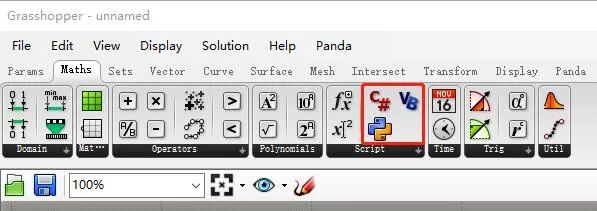
1.2.1. C# Scripts
1.2.1.1. 开发环境配置
1.配置SAP2000V1.dll文件
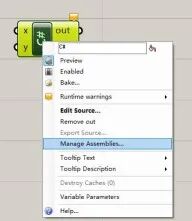
2.基本语法与Visual Studio中的C#环境一致 (1)获取当前正在运行的SAP2000对象 cOAPI mySapObject = null; mySapObject = (cOAPI)System.Runtime.InteropServices.Marshal.GetActiveObject(“CSI.SAP2000.API.SapObject”); cSapModel sapModel = mySapObject.SapModel;
} (2)新建SAP2000对象 cHelper myHelper; myHelper = new Helper(); cOAPI mySapObject = null; mySapObject = myHelper.CreateObject(@“C:\Program Files\Computers and Structures\SAP2000 22\SAP2000.exe”); //或者 //mySapObject = myHelper.CreateObjectProgID(“CSI.SAP2000.API.SapObject”); mySapObject.ApplicationStart(); cSapModel mySapModel; mySapModel = mySapObject.SapModel; mySapModel.InitializeNewModel((eUnits.kip_in_F));
1.2.1.2. 与几何对象的交互
Rhino的API文档地址:https://developer.rhino3d.com/api/RhinoCommon/html/R_Project_RhinoCommon.htm#! 几何对象的属性说明主要在Rhino.Geometry Namespace下 (1)点 cOAPI mySapObject = null; mySapObject = (cOAPI) System.Runtime.InteropServices.Marshal.GetActiveObject(“CSI.SAP2000.API.SapObject”); cSapModel sapModel = mySapObject.SapModel; if(!build){return;} for(int i = 0;i < point.Count;i++) { string Name = “Point” + Convert.ToString(i); sapModel.PointObj.AddCartesian(point[i].X, point[i].Y, point[i].Z, ref Name); } (2)线 cOAPI mySapObject = null; mySapObject = (cOAPI) System.Runtime.InteropServices.Marshal.GetActiveObject(“CSI.SAP2000.API.SapObject”); cSapModel sapModel = mySapObject.SapModel; if(!build){return;} string mat = “C30”; sapModel.PropMaterial.AddMaterial(ref mat, eMatType.Concrete, “China”, “GB”, “GB50010 C30”); string sec = “Frame”; sapModel.PropFrame.SetRectangle(sec, “C30”, 800, 300); for(int i = 0;i < curve.Count;i++) { string Name = “Curve” + Convert.ToString(i); Point3d startPoint = curve[i].PointAtStart; Point3d endPoint = curve[i].PointAtEnd; sapModel.FrameObj.AddByCoord(startPoint.X, startPoint.Y, startPoint.Z, endPoint.X, endPoint.Y, endPoint.Z, ref Name, sec); } (3)面 cOAPI mySapObject = null; mySapObject = (cOAPI) System.Runtime.InteropServices.Marshal.GetActiveObject(“CSI.SAP2000.API.SapObject”); cSapModel sapModel = mySapObject.SapModel; if(!build){return;} string mat = “C30”; sapModel.PropMaterial.AddMaterial(ref mat, eMatType.Concrete, “China”, “GB”, “GB50010 C30”); string sec = “Area”; sapModel.PropArea.SetShell(sec, 1, mat, 0, 120, 120); for(int i = 0;i < surface.Count;i++) { string Name = “surface” + Convert.ToString(i); Brep surfaceItem = surface[i]; BrepVertexList corners = surfaceItem.Vertices; double[] corner_X = newdouble[3]; double[] corner_Y = newdouble[3]; double[] corner_Z = newdouble[3]; for(int j = 0;j < corners.Count;j++) { BrepVertex cornerItem = corners[j]; corner_X[j] = cornerItem.Location.X; corner_Y[j] = cornerItem.Location.Y; corner_Z[j] = cornerItem.Location.Z; } sapModel.AreaObj.AddByCoord(3, ref corner_X, ref corner_Y, ref corner_Z, ref Name, sec); }
1.2.2. GHPython Scripts
1.2.2.1. 开发环境配置
import math import rhinoscriptsyntax as rs import sys import clr import System
sapDllPath =r’C:\Program Files\Computers and Structures\SAP2000 22’ ProgramPath=r’C:\Program Files\Computers and Structures\SAP2000 22\SAP2000.exe’ sapDllName = ‘SAP2000v1.dll’ sys.path.append(sapDllPath) clr.AddReference(sapDllName)
import SAP2000v1 from SAP2000v1 import *
mhelper = SAP2000v1.Helper() ##获取已有的SAP2000对象 mySapObject = mhelper.GetObject(“CSI.SAP2000.API.SapObject”)
#新建SAP2000对象 #mySapObject=mhelper.CreateObject(r”G:\Program Files\Computers and Structures\SAP2000 22\SAP2000.exe”) #mySapObject = mhelper.CreateObjectProgID(“CSI.SAP2000.API.SapObject”) #mySapObject.ApplicationStart()
SapModel= mySapObject.SapModel SapModel.InitializeNewModel() ret = SapModel.File.NewBlank()
1.1.2.2. 与几何对象的交互
RhinoScriptSyntax开发文档:https://developer.rhino3d.com/api/RhinoScriptSyntax/ grasshopper中的GHPython是IronPython,与.Net框架交互,Python版本为2.7,无法直接引用内存环境中的库,因此与原生Python环境的配置以及代码的书写有很大的不同。 (1)点 import math import rhinoscriptsyntax as rs import sys import clr import System
sapDllPath=r’G:\Program Files\Computers and Structures\SAP2000 22’ ProgramPath=r’G:\Program Files\Computers and Structures\SAP2000 22\SAP2000.exe’ sapDllName = ‘SAP2000v1.dll’ sys.path.append(sapDllPath) clr.AddReference(sapDllName)
import SAP2000v1 from SAP2000v1 import *
mhelper = SAP2000v1.Helper() mySapObject = mhelper.GetObject(“CSI.SAP2000.API.SapObject”) SapModel= mySapObject.SapModel
if build: for i,pointCoor in enumerate(point): name=str(i) name= clr.ReferenceSystem.String SapModel.PointObj.AddCartesian(pointCoor[0],pointCoor[1],pointCoor[2],name) (2)线 import math import rhinoscriptsyntax as rs import sys import clr import System
sapDllPath=r’G:\Program Files\Computers and Structures\SAP2000 22’ ProgramPath=r’G:\Program Files\Computers and Structures\SAP2000 22\SAP2000.exe’ sapDllName = ‘SAP2000v1.dll’ sys.path.append(sapDllPath) clr.AddReference(sapDllName)
import SAP2000v1 from SAP2000v1 import *
mhelper = SAP2000v1.Helper() mySapObject = mhelper.GetObject(“CSI.SAP2000.API.SapObject”) SapModel= mySapObject.SapModel if build: mat = “C30”; mat=clr.ReferenceSystem.String SapModel.PropMaterial.AddMaterial(mat, eMatType.Concrete, “China”, “GB”, “GB50010 C30”); sec = “Frame”; SapModel.PropFrame.SetRectangle(sec, “C30”, 800, 300); for i,curveItem in enumerate(curve): name=str(i) name= clr.ReferenceSystem.String sp=rs.CurveStartPoint(curveItem) ep=rs.CurveEndPoint(curveItem) SapModel.FrameObj.AddByCoord(sp[0], sp[1], sp[2],ep[0], ep[1], ep[2], name, sec); (3)面 import math import rhinoscriptsyntax as rs import sys import clr import System
sapDllPath=r’G:\Program Files\Computers and Structures\SAP2000 22’ ProgramPath=r’G:\Program Files\Computers and Structures\SAP2000 22\SAP2000.exe’ sapDllName = ‘SAP2000v1.dll’ sys.path.append(sapDllPath) clr.AddReference(sapDllName)
import SAP2000v1 from SAP2000v1 import *
mhelper = SAP2000v1.Helper() mySapObject = mhelper.GetObject(“CSI.SAP2000.API.SapObject”) SapModel= mySapObject.SapModel #if build: mat = “C30”; mat=clr.ReferenceSystem.String SapModel.PropMaterial.AddMaterial(mat, eMatType.Concrete, “China”, “GB”, “GB50010 C30”); sec = “Area”; SapModel.PropArea.SetShell(sec, 1, “C30”, 0, 120, 120); for i,surfaceItem in enumerate(surface): name=str(i) name= clr.ReferenceSystem.String points=rs.SurfacePoints(surfaceItem) pointNumber= len(points) corner_X=System.Array.CreateInstance(float,pointNumber) corner_Y=System.Array.CreateInstance(float, pointNumber) corner_Z=System.Array.CreateInstance(float, pointNumber) for i, pointItem in enumerate(points): corner_X[i]=pointItem[0] corner_Y[i]=pointItem[1] corner_Z[i]=pointItem[2] corner_X_n=clr.StrongBoxSystem.Array[float] corner_Y_n=clr.StrongBoxSystem.Array[float] corner_Z_n=clr.StrongBoxSystem.Array[float] SapModel.AreaObj.AddByCoord(pointNumber, corner_X_n, corner_Y_n, corner_Z_n, name, sec); 此处很多朋友都来问说面不能成功显示出来。 主要有两个问题: ①确保面的角点坐标和数量均正确 ②角点逆时针排序 (4)Python除了使用RhinoScriptSyntax外,也可以直接引用Rhino的库 import rhinoscriptsyntax as rs from Rhino.Geometry import *
a=Point3d(10,10,10)
1.2.3. 脚本案例
1.2.3.1. 制作一个建立梁单元的电池,并建立参数化结构分析模型
添加相关参数
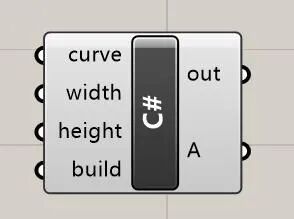
cOAPI mySapObject = null; mySapObject = (cOAPI) System.Runtime.InteropServices.Marshal.GetActiveObject(“CSI.SAP2000.API.SapObject”); cSapModel sapModel = mySapObject.SapModel; if(!build){return;} string mat = “C30”; sapModel.PropMaterial.AddMaterial(ref mat, eMatType.Concrete, “China”, “GB”, “GB50010 C30”); string sec = “Frame”; sapModel.PropFrame.SetRectangle(sec, “C30”, height, width); string Name = “Beam”; Point3d startPoint = curve.PointAtStart; Point3d endPoint = curve.PointAtEnd; sapModel.FrameObj.AddByCoord(startPoint.X, startPoint.Y, startPoint.Z, endPoint.X, endPoint.Y, endPoint.Z, ref Name, sec);
1.2.3.2. 通过Galapagos进行最优化分析
新建模型 cOAPI mySapObject = null; mySapObject = (cOAPI) System.Runtime.InteropServices.Marshal.GetActiveObject(“CSI.SAP2000.API.SapObject”); cSapModel sapModel = mySapObject.SapModel; if(!build){return;} sapModel.InitializeNewModel(); sapModel.File.NewBlank(); A = true; 运行分析并提取结果 cOAPI mySapObject = null; mySapObject = (cOAPI) System.Runtime.InteropServices.Marshal.GetActiveObject(“CSI.SAP2000.API.SapObject”); cSapModel sapModel = mySapObject.SapModel; if(!build){return;} sapModel.SetModelIsLocked(false); sapModel.SelectObj.CoordinateRange(-100000, 100000, -100000, 100000, -100, 100, false, “Global”, false, true, false); bool[] Res = newbool[6]{true,true,true,false,false,false}; sapModel.PointObj.SetRestraint(“1”, ref Res, eItemType.SelectedObjects); sapModel.File.Save(@“D:\2021\study\07-grasshopperTutorial\example_01\test02.sdb”); sapModel.Analyze.RunAnalysis();
sapModel.Results.Setup.DeselectAllCasesAndCombosForOutput(); sapModel.Results.Setup.SetCaseSelectedForOutput(“DEAD”); int NumberResults = 0; string[] Obj = newstring[1]; string[] Elm = newstring[1]; string[] LoadCase = newstring[1]; string[] StepType = newstring[1]; double[] StepNum = newdouble[1]; double[] U1 = newdouble[1]; double[] U2 = newdouble[1]; double[] U3 = newdouble[1]; double[] R1 = newdouble[1]; double[] R2 = newdouble[1]; double[] R3 = newdouble[1]; sapModel.Results.JointDispl(“77”, eItemTypeElm.ObjectElm, ref NumberResults, ref Obj, ref Elm, ref LoadCase, ref StepType, ref StepNum, ref U1, ref U2, ref U3, ref R1, ref R2, ref R3); A = U3[0];
我们非解构一直关注建筑艺术与结构技术的有机融合。我们在做好设计的同时,一直关注数字化、智能化等前沿技术在建筑设计行业中的运用,这些年一直在坚持探索和实践。
非常欢迎优秀的你来加入我们,一起来跨界,做一名推动行业发展的斜杠青年。
非解构 | 跨界建筑师招募 非解构 | 跨界结构工程师招募 非解构 | 算法工程师招募 结构跨界实习生招募
这几年,对参数化设计感兴趣的朋友越来越多,我们的参数化设计交流群也已经发展到了5群,欢迎更多的朋友加入,相互交流学习。

添加我们“大菲儿”微信, 加入参数化设计交流群。

不了解我们的可以来补课了 非解构 | 数字化技术助力探索结构设计新空间 非解构 | 参数化建筑设计技术路径探讨 非解构 | 对BIM工作流的深度思考 当结构设计遇到遗传算法 当建筑师甩给我一个Rhino模型(一) 当建筑师甩给我一个rhino模型(二) 盈建科,二次开发 PKPM, 二次开发

本文档由AI从非解构公众号自动采集整理,仅供学习参考。
LOADING…