Grasshopper calls SAP2000 API tutorial document (2)
Grasshopper calls SAP2000 API tutorial document (2)
Official Account: Non-Deconstructive · Author: Zhou Wenqi (Venchy)
Grasshopper calls SAP2000 API tutorial
Grasshopper contains three script batteries, C#, VB and GHPython. At the same time, food4rhino (https://www.food4rhino.com/) also contains some batteries that can be scripted.
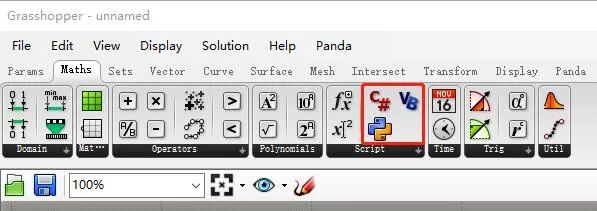
1.2.1. C# Scripts
1.2.1.1. 开发环境配置
- Configure the SAP2000V1.dll file
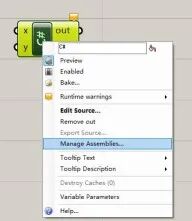
- The basic syntax is consistent with the C# environment in Visual Studio (1) Get the currently running SAP2000 object cOAPI mySapObject = null; mySapObject = (cOAPI)System.Runtime.InteropServices.Marshal.GetActiveObject(“CSI.SAP2000.API.SapObject”); cSapModel sapModel = mySapObject.SapModel;
} (2) Create a new SAP2000 object cHelper myHelper; myHelper = new Helper(); cOAPI mySapObject = null; mySapObject = myHelper.CreateObject(@“C:\Program Files\Computers and Structures\SAP2000 22\SAP2000.exe”); //or //mySapObject = myHelper.CreateObjectProgID(“CSI.SAP2000.API.SapObject”); mySapObject.ApplicationStart(); cSapModel mySapModel; mySapModel = mySapObject.SapModel; mySapModel.InitializeNewModel((eUnits.kip_in_F));
1.2.1.2. Interaction with geometric objects
Rhino’s API documentation address: https://developer.rhino3d.com/api/RhinoCommon/html/R_Project_RhinoCommon.htm#! The attribute description of geometric objects is mainly under Rhino.Geometry Namespace (1) point cOAPI mySapObject = null; mySapObject = (cOAPI) System.Runtime.InteropServices.Marshal.GetActiveObject(“CSI.SAP2000.API.SapObject”); cSapModel sapModel = mySapObject.SapModel; if(!build){return;} for(int i = 0;i < point.Count;i++) { string Name = “Point” + Convert.ToString(i); sapModel.PointObj.AddCartesian(point[i].X, point[i].Y, point[i].Z, ref Name); } (2)线 cOAPI mySapObject = null; mySapObject = (cOAPI) System.Runtime.InteropServices.Marshal.GetActiveObject(“CSI.SAP2000.API.SapObject”); cSapModel sapModel = mySapObject.SapModel; if(!build){return;} string mat = “C30”; sapModel.PropMaterial.AddMaterial(ref mat, eMatType.Concrete, “China”, “GB”, “GB50010 C30”); string sec = “Frame”; sapModel.PropFrame.SetRectangle(sec, “C30”, 800, 300); for(int i = 0;i < curve.Count;i++) { string Name = “Curve” + Convert.ToString(i); Point3d startPoint = curve[i].PointAtStart; Point3d endPoint = curve[i].PointAtEnd; sapModel.FrameObj.AddByCoord(startPoint.X, startPoint.Y, startPoint.Z, endPoint.X, endPoint.Y, endPoint.Z, ref Name, sec); } (3) Noodles cOAPI mySapObject = null; mySapObject = (cOAPI) System.Runtime.InteropServices.Marshal.GetActiveObject(“CSI.SAP2000.API.SapObject”); cSapModel sapModel = mySapObject.SapModel; if(!build){return;} string mat = “C30”; sapModel.PropMaterial.AddMaterial(ref mat, eMatType.Concrete, “China”, “GB”, “GB50010 C30”); string sec = “Area”; sapModel.PropArea.SetShell(sec, 1, mat, 0, 120, 120); for(int i = 0;i < surface.Count;i++) { string Name = “surface” + Convert.ToString(i); Brep surfaceItem = surface[i]; BrepVertexList corners = surfaceItem.Vertices; double[] corner_X = newdouble[3]; double[] corner_Y = newdouble[3]; double[] corner_Z = newdouble[3]; for(int j = 0;j < corners.Count;j++) { BrepVertex cornerItem = corners[j]; corner_X[j] = cornerItem.Location.X; corner_Y[j] = cornerItem.Location.Y; corner_Z[j] = cornerItem.Location.Z; } sapModel.AreaObj.AddByCoord(3, ref corner_X, ref corner_Y, ref corner_Z, ref Name, sec); }
1.2.2. GHPython Scripts
1.2.2.1. Development environment configuration
import math import rhinoscriptsyntax as rs import sys import clr import System
sapDllPath =r’C:\Program Files\Computers and Structures\SAP2000 22’ ProgramPath=r’C:\Program Files\Computers and Structures\SAP2000 22\SAP2000.exe’ sapDllName = ‘SAP2000v1.dll’ sys.path.append(sapDllPath) clr.AddReference(sapDllName)
import SAP2000v1 from SAP2000v1 import *
mhelper = SAP2000v1.Helper()
Get existing SAP2000 objects
mySapObject = mhelper.GetObject(“CSI.SAP2000.API.SapObject”)
New SAP2000 object
mySapObject=mhelper.CreateObject(r”G:\Program Files\Computers and Structures\SAP2000 22\SAP2000.exe”)
mySapObject = mhelper.CreateObjectProgID(“CSI.SAP2000.API.SapObject”)
mySapObject.ApplicationStart()
SapModel= mySapObject.SapModel SapModel.InitializeNewModel() ret = SapModel.File.NewBlank()
1.1.2.2. Interaction with geometric objects
RhinoScriptSyntax development documentation: https://developer.rhino3d.com/api/RhinoScriptSyntax/ GHPython in grasshopper is IronPython, which interacts with the .Net framework. The Python version is 2.7 and cannot directly reference libraries in the memory environment. Therefore, the configuration and code writing of the native Python environment are very different. (1) point import math import rhinoscriptsyntax as rs import sys import clr import System
sapDllPath=r’G:\Program Files\Computers and Structures\SAP2000 22’ ProgramPath=r’G:\Program Files\Computers and Structures\SAP2000 22\SAP2000.exe’ sapDllName = ‘SAP2000v1.dll’ sys.path.append(sapDllPath) clr.AddReference(sapDllName)
import SAP2000v1 from SAP2000v1 import *
mhelper = SAP2000v1.Helper() mySapObject = mhelper.GetObject(“CSI.SAP2000.API.SapObject”) SapModel= mySapObject.SapModel
if build: for i,pointCoor in enumerate(point): name=str(i) name= clr.ReferenceSystem.String SapModel.PointObj.AddCartesian(pointCoor[0],pointCoor[1],pointCoor[2],name) (2)线 import math import rhinoscriptsyntax as rs import sys import clr import System
sapDllPath=r’G:\Program Files\Computers and Structures\SAP2000 22’ ProgramPath=r’G:\Program Files\Computers and Structures\SAP2000 22\SAP2000.exe’ sapDllName = ‘SAP2000v1.dll’ sys.path.append(sapDllPath) clr.AddReference(sapDllName)
import SAP2000v1 from SAP2000v1 import *
mhelper = SAP2000v1.Helper() mySapObject = mhelper.GetObject(“CSI.SAP2000.API.SapObject”) SapModel= mySapObject.SapModel if build: mat = “C30”; mat=clr.ReferenceSystem.String SapModel.PropMaterial.AddMaterial(mat, eMatType.Concrete, “China”, “GB”, “GB50010 C30”); sec = “Frame”; SapModel.PropFrame.SetRectangle(sec, “C30”, 800, 300); for i,curveItem in enumerate(curve): name=str(i) name= clr.ReferenceSystem.String sp=rs.CurveStartPoint(curveItem) ep=rs.CurveEndPoint(curveItem) SapModel.FrameObj.AddByCoord(sp[0], sp[1], sp[2],ep[0], ep[1], ep[2], name, sec); (3) Noodles import math import rhinoscriptsyntax as rs import sys import clr import System
sapDllPath=r’G:\Program Files\Computers and Structures\SAP2000 22’ ProgramPath=r’G:\Program Files\Computers and Structures\SAP2000 22\SAP2000.exe’ sapDllName = ‘SAP2000v1.dll’ sys.path.append(sapDllPath) clr.AddReference(sapDllName)
import SAP2000v1 from SAP2000v1 import *
mhelper = SAP2000v1.Helper() mySapObject = mhelper.GetObject(“CSI.SAP2000.API.SapObject”) SapModel= mySapObject.SapModel
if build:
mat = “C30”; mat=clr.ReferenceSystem.String SapModel.PropMaterial.AddMaterial(mat, eMatType.Concrete, “China”, “GB”, “GB50010 C30”); sec = “Area”; SapModel.PropArea.SetShell(sec, 1, “C30”, 0, 120, 120); for i,surfaceItem in enumerate(surface): name=str(i) name= clr.ReferenceSystem.String points=rs.SurfacePoints(surfaceItem) pointNumber= len(points) corner_X=System.Array.CreateInstance(float,pointNumber) corner_Y=System.Array.CreateInstance(float, pointNumber) corner_Z=System.Array.CreateInstance(float, pointNumber) for i, pointItem in enumerate(points): corner_X[i]=pointItem[0] corner_Y[i]=pointItem[1] corner_Z[i]=pointItem[2] corner_X_n=clr.StrongBoxSystem.Array[float] corner_Y_n=clr.StrongBoxSystem.Array[float] corner_Z_n=clr.StrongBoxSystem.Array[float] SapModel.AreaObj.AddByCoord(pointNumber, corner_X_n, corner_Y_n, corner_Z_n, name, sec); 此处很多朋友都来问说面不能成功显示出来。 There are two main problems: ① Make sure that the coordinates and quantities of the corner points of the surface are correct ②Corner points are sorted counterclockwise (4) In addition to using RhinoScriptSyntax, Python can also directly reference Rhino libraries. import rhinoscriptsyntax as rs from Rhino.Geometry import *
a=Point3d(10,10,10)
1.2.3. Script case
1.2.3.1. Make a battery with a beam unit and establish a parametric structural analysis model
Add relevant parameters
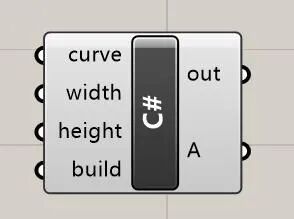
cOAPI mySapObject = null; mySapObject = (cOAPI) System.Runtime.InteropServices.Marshal.GetActiveObject(“CSI.SAP2000.API.SapObject”); cSapModel sapModel = mySapObject.SapModel; if(!build){return;} string mat = “C30”; sapModel.PropMaterial.AddMaterial(ref mat, eMatType.Concrete, “China”, “GB”, “GB50010 C30”); string sec = “Frame”; sapModel.PropFrame.SetRectangle(sec, “C30”, height, width); string Name = “Beam”; Point3d startPoint = curve.PointAtStart; Point3d endPoint = curve.PointAtEnd; sapModel.FrameObj.AddByCoord(startPoint.X, startPoint.Y, startPoint.Z, endPoint.X, endPoint.Y, endPoint.Z, ref Name, sec);
1.2.3.2. 通过Galapagos进行最优化分析
New model cOAPI mySapObject = null; mySapObject = (cOAPI) System.Runtime.InteropServices.Marshal.GetActiveObject(“CSI.SAP2000.API.SapObject”); cSapModel sapModel = mySapObject.SapModel; if(!build){return;} sapModel.InitializeNewModel(); sapModel.File.NewBlank(); A = true; Run analysis and extract results cOAPI mySapObject = null; mySapObject = (cOAPI) System.Runtime.InteropServices.Marshal.GetActiveObject(“CSI.SAP2000.API.SapObject”); cSapModel sapModel = mySapObject.SapModel; if(!build){return;} sapModel.SetModelIsLocked(false); sapModel.SelectObj.CoordinateRange(-100000, 100000, -100000, 100000, -100, 100, false, “Global”, false, true, false); bool[] Res = newbool[6]{true,true,true,false,false,false}; sapModel.PointObj.SetRestraint(“1”, ref Res, eItemType.SelectedObjects); sapModel.File.Save(@“D:\2021\study\07-grasshopperTutorial\example_01\test02.sdb”); sapModel.Analyze.RunAnalysis();
sapModel.Results.Setup.DeselectAllCasesAndCombosForOutput(); sapModel.Results.Setup.SetCaseSelectedForOutput(“DEAD”); int NumberResults = 0; string[] Obj = newstring[1]; string[] Elm = newstring[1]; string[] LoadCase = newstring[1]; string[] StepType = newstring[1]; double[] StepNum = newdouble[1]; double[] U1 = newdouble[1]; double[] U2 = newdouble[1]; double[] U3 = newdouble[1]; double[] R1 = newdouble[1]; double[] R2 = newdouble[1]; double[] R3 = newdouble[1]; sapModel.Results.JointDispl(“77”, eItemTypeElm.ObjectElm, ref NumberResults, ref Obj, ref Elm, ref LoadCase, ref StepType, ref StepNum, ref U1, ref U2, ref U3, ref R1, ref R2, ref R3); A = U3[0];
We at Non-Deconstruction have always focused on the organic integration of architectural art and structural technology. While we are doing a good job in design, we have always paid attention to the application of cutting-edge technologies such as digitalization and intelligence in the architectural design industry. We have been exploring and practicing these years.
We very much welcome outstanding people to join us, cross boundaries together, and become a slash youth who promotes the development of the industry.
Non-deconstruction | Recruitment of cross-border architects Non-deconstruction | Recruitment of cross-border structural engineers Non-deconstruction | Algorithm Engineer Recruitment 结构跨界实习生招募
In recent years, more and more friends are interested in parametric design. Our parametric design exchange group has grown to 5 groups. More friends are welcome to join and communicate and learn from each other.

Add our “Da Feier” WeChat, Join the parametric design exchange group.
If you don’t know us, you can come to make up lessons. Non-deconstruction | Digital technology helps explore new space for structural design Non-deconstruction | Discussion on the technical path of parametric architectural design Non-deconstruction | In-depth thinking on BIM workflow When structural design meets genetic algorithms When an architect dumps me a Rhino model (1) 当建筑师甩给我一个rhino模型(二) Yingjianke, secondary development PKPM, 二次开发
*This document is automatically collected and organized by AI from non-deconstructed public accounts and is for learning reference only. *
Original Source: https://mp.weixin.qq.com/s/YC0E87RyW6evpZyD2mNSwg
LOADING…